Thursday, 22 November 2018

Error:- ORA-28365: wallet is not open


Issue: - (OIM 11gR2PS3) Error faced while running queries in OIM
Error: - ORA-28365: wallet is not open
              28365. 0000 -  "wallet is not open"
              *Cause:    The security module wallet has not been opened.
              *Action:   Open the wallet.


Solution:-
                   1.) Connect sqlplus / as sysdba
                   2.) ALTER SYSTEM SET ENCRYPTION WALLET OPEN IDENTIFIED BY "password";
                   3.) Exit


Thanks,
Aditya.

Saturday, 27 October 2018

RCU-6080:Global prerequisite check failed – The selected Oracle database is a multitenant container database (CDB).

Issue:-Error faced while installing 12C RCU
Error:-RCU-6080:Global prerequisite check failed – Check requirement for specified database

          The selected Oracle database is a multitenant container database (CDB). 

          Connecting to a multitenant container database (CDB) is not supported. 

          Instead, connect to a valid pluggble database (PDB)

Solution 1:-
1.) Check where are your PDB installed(below my example):

SQL> select name from v$services;
NAME
pdborcl

weblogicXDB

weblogic

SYS$BACKGROUND

SYS$USERS


2) Alter your database:

 SQL> alter pluggable database all open;
 3) Insert the correct service name. On my case, is pdborcl:
      Try to re run RCU

Or

Solution 2:-


Note:- Make sure you are entering correct SID.
when i installed oracle database 12c i left global database name as default (orcl) and during  RCU run, i was entering global database name at the place of SID information.

Then i re-installed database and changed my global database name same as SID and re-run RCU,it was successful.

if u see above error make sure you are entering correct database information when running RCU


Thanks,
Aditya.

Friday, 12 October 2018

‘Opatch’ is not recognized as an internal or external command

                 ‘Opatch’ is not recognized as an internal or external command

Environment:-Windows Server 2012R2 IIS application

Error:- ‘Opatch’ is not recognized as an internal or external command while installing
               patch for IIS webagte 11.1.2.3

Solution:-

My correct path is “C:\oracle\product\11.1.1\as_1” but i used wrong path in above command prompt “C:\oracle\product\11.1.1\as_1”. So, i got the error like ‘optach’ is not recognized.

run below commands by correcting the path


set ORACLE_HOME=C:\oracle\product\11.1.1\as_1
and then execute the below javascripts
set PATH=%ORACLE_HOME%\bin;%PATH%
set JAVA_HOME=%ORACLE_HOME%\jdk
set PATH=%JAVA_HOME%\bin;%PATH%
set PATH=%ORACLE_HOME%\OPatch;%PATH%


After setting above commands try to run opatch apply command

If the patch got succeed then we will get message like "opatch succeeded"


Regards,
Aditya.

Saturday, 22 September 2018

Enabling White List Mode in Oracle Access Manager

OAM: Enable White Listing mode

                       We are going to cover about the commands that can be used to enable White listing of URLs in OAM and enable it on OAM Protected applications. This white listing of URLs helps to avoid re-directions to external sites/URLs that are not registered with OAM.

Environment:
OAM 11.1.2.3BP07
RHEL6/OEL6
Steps:

      Enabling and configuring White-listing  mode is very simple and just requires the
     following acitivites.

Enable OAM White listing Mode
Adding/Removing URLs to/from the list of White listed URLs

1. Enable OAM White listing Mode:
Login to the server that contains installation of OAM component
Browse to the following directory
<Oracle_IDM_Home>/common/bin
Execute the following commands
./wlst.sh
connect('weblogic','password','t3://oamhost:7001'>)
domainRuntime()
oamSetWhiteListMode(oamWhiteListMode="true")
This returns the success message as shown below.


2. Adding/Removing URLs to/from the list of White listed URLs :
Execute the below command to add a URL to the list
oamWhiteListURLConfig(Name="SampleApplication",Value="http://Sample Application ,Operation="Update")  

Execute the below command to remove a URL from the list
oamWhiteListURLConfig(Name="SampleApplication",Value="http://Sample Application ,Operation="Remove")  


Thanks,
Aditya


Thursday, 6 September 2018

The process cannot access the flie because it is being used by another process exception from HRESULT:0*80070020

Issue:-At times you may notice that one or more Web sites are not started in IIS 7.0. If you try to manually start the Web site, it may fail with the following error message:

Internet Information Services (IIS) Manager - The process cannot access the file because it is being used by another process.
(Exception from HRESULT: 0x80070020)


Environment:-Windows 2012R2 server

Error Cause:-The error code 0x80070020 translates to ERROR_SHARING_VIOLATION (The process cannot access the file because it is being used by another process.)

This issue may occur if TCP port 80 and/or 443 is grabbed by a different service.

Solution:-First check to see what is listening on port 80.
                Open a command prompt and enter the following command:

                 netstat -ano | find ":80"

 netstat -aon | find ":443"
  
  In this case process ID 4228 was listening on port 80.
                  To check what this process is open task manager and locate that PID.
  (Note you may need to select View -> Select columns -> PID first).

 1.It turns out a developer installed Apache which was listeningon port 80 and
    causing a conflict.To resolve the conflict change one service to run on a different
    port or uninstall the unnecessary web server.
 2.In Task bar we can select httpd.exe running on  port 80 and end process

Now you can start and stop IIS website.


Thanks,
Aditya.

Tuesday, 24 July 2018

Error:-Bind Failed. Host='oiddomain.com' Details: [LDAP: error code 53 - Password Policy Error :9001: cn=orcladmin : Your account is locked. Contact your OID administrator.]

Error:-Bind Failed. Host='oiddomain.com'
Details: [LDAP: error code 53 - Password Policy Error :9001: cn=orcladmin : Your account is locked. Contact your OID administrator.]


Cause:-1.)If we used ldapsearch command with wrong password more than
                  allowed times
              2.)When accessing odsm console with orcladmin user with wrong password
                  more than allowed times
Solution:-

1.) export ORACLE_INSTANCE=/u01/Oracle_IDM1/asinst_1

     ./oidpasswd connect=OIDDB unlock_su_acct=true

      OID DB user password:

      [gsdsiConnect] Error Creating OCI Environment :-1

      ERROR * gsldpuUnlockSuAccount * ORA-0:▒▒▒▒ encountered

      OID super user account unlocked successfully.

      OIDDB is the TNS Connect string for your Repository database

      Login to the OID database via sqlplus as an user with DBA privileges
     (example. SYS or SYSTEM) and reset the ODS schema password:

     Connect to OIDDB database as SYS user and change ODS account password

     sqlplus

     SQL*Plus: Release 12.2.0.1.0 Production on Fri Jun 22 12:48:09 2018

    Copyright (c) 1982, 2016, Oracle.  All rights reserved.

    Enter user-name: sys as sysdba

    Enter password:XXXXX

   Connected to:

   Oracle Database 12c Enterprise Edition Release 12.2.0.1.0 - 64bit Production

  SQL> alter user ods identified by xxxxx;

  User altered.

  SQL> exit

  Disconnected from Oracle Database 12c Enterprise Edition Release 12.2.0.1.0 - 64bit Production

2.) Now we know  ODS password.Try to unlock the orcladmin account

    export ORACLE_INSTANCE=/u01/Oracle_IDM1/asinst_1

   ./oidpasswd connect=OIDDB reset_su_password=true

    Could not initialize oidldapd Server. Result code = %ld

    export ORACLE_HOME=/u01/Oracle_IDM1
   ./oidpasswd connect=OIDDB reset_su_password=true
   OID DB user password:XXXXX
   new password:XXXXX
   confirm password:XXXXX
   password set

3.)./oidpasswd connect=OIDDB unlock_su_acct=true
    OID DB user password:
    OID super user account unlocked successfully.

   You know the orcladmin password now !!!
   Start OID processes..
   cd /u01/Oracle_IDM1/asinst_1/bin
   opmnctl: starting opmn managed processes…

 Now, you can try to access odsm console and  rerun commands which 
 requires orcladmin  account  passwords


Thanks,
Aditya.

Sunday, 1 July 2018

Cloned Oracle Linux (OEL) is missing eth0

Issue:-In my case i faced problem with oracle linux 6.5 cloned server is 
            that it would not have the eth0 network interface
            (no IP address from the DHCP).

Note:-I use a DHCP to assign the IP addresses to these cloned servers.

Troubleshooting:-

I had a problem with the eth0 network interface missing with the cloned server.
ifconfig – When I ran the ifconfig command, I did not see the DHCP assigned IP address.
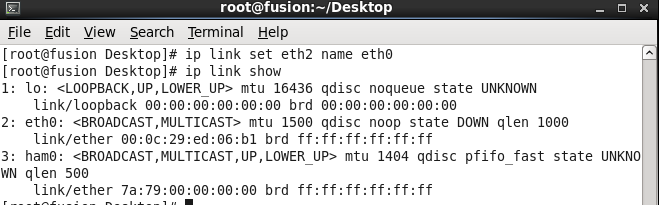
When we ran the command ip link show, I did not see the network interface eth0.
I tried running network restart command i received below error
Bringing up interface eth0:  Device eth0 does not seem to be present, delaying initialization.

Solution:-

1.) Login as root
2.) Run the command to remove this file: 
      rm –f /etc/udev/rules.d/70-persistent-net.rules
3.) Edit the file ifcfg-eth0
      run following command: vim /etc/sysconfig/network-scripts/ifcfg-eth0
4.) Remove two line from this file. The line that starts with UUID, and the line
      that starts with HWADDR.

5.) Once above two lines are removed them save and quit (wq!)
6.) Run following below command
      ip link set eth1 name eth0
7.) Run following command ip link show to verify that it was renamed
8.)Reboot your machine and Login as root
9.)Run following command and verify:-ifconfig


Thanks,
Aditya.