Saturday, 22 September 2018

Enabling White List Mode in Oracle Access Manager

OAM: Enable White Listing mode

                       We are going to cover about the commands that can be used to enable White listing of URLs in OAM and enable it on OAM Protected applications. This white listing of URLs helps to avoid re-directions to external sites/URLs that are not registered with OAM.

Environment:
OAM 11.1.2.3BP07
RHEL6/OEL6
Steps:

      Enabling and configuring White-listing  mode is very simple and just requires the
     following acitivites.

Enable OAM White listing Mode
Adding/Removing URLs to/from the list of White listed URLs

1. Enable OAM White listing Mode:
Login to the server that contains installation of OAM component
Browse to the following directory
<Oracle_IDM_Home>/common/bin
Execute the following commands
./wlst.sh
connect('weblogic','password','t3://oamhost:7001'>)
domainRuntime()
oamSetWhiteListMode(oamWhiteListMode="true")
This returns the success message as shown below.


2. Adding/Removing URLs to/from the list of White listed URLs :
Execute the below command to add a URL to the list
oamWhiteListURLConfig(Name="SampleApplication",Value="http://Sample Application ,Operation="Update")  

Execute the below command to remove a URL from the list
oamWhiteListURLConfig(Name="SampleApplication",Value="http://Sample Application ,Operation="Remove")  


Thanks,
Aditya


Thursday, 6 September 2018

The process cannot access the flie because it is being used by another process exception from HRESULT:0*80070020

Issue:-At times you may notice that one or more Web sites are not started in IIS 7.0. If you try to manually start the Web site, it may fail with the following error message:

Internet Information Services (IIS) Manager - The process cannot access the file because it is being used by another process.
(Exception from HRESULT: 0x80070020)


Environment:-Windows 2012R2 server

Error Cause:-The error code 0x80070020 translates to ERROR_SHARING_VIOLATION (The process cannot access the file because it is being used by another process.)

This issue may occur if TCP port 80 and/or 443 is grabbed by a different service.

Solution:-First check to see what is listening on port 80.
                Open a command prompt and enter the following command:

                 netstat -ano | find ":80"

 netstat -aon | find ":443"
  
  In this case process ID 4228 was listening on port 80.
                  To check what this process is open task manager and locate that PID.
  (Note you may need to select View -> Select columns -> PID first).

 1.It turns out a developer installed Apache which was listeningon port 80 and
    causing a conflict.To resolve the conflict change one service to run on a different
    port or uninstall the unnecessary web server.
 2.In Task bar we can select httpd.exe running on  port 80 and end process

Now you can start and stop IIS website.


Thanks,
Aditya.

Tuesday, 24 July 2018

Error:-Bind Failed. Host='oiddomain.com' Details: [LDAP: error code 53 - Password Policy Error :9001: cn=orcladmin : Your account is locked. Contact your OID administrator.]

Error:-Bind Failed. Host='oiddomain.com'
Details: [LDAP: error code 53 - Password Policy Error :9001: cn=orcladmin : Your account is locked. Contact your OID administrator.]


Cause:-1.)If we used ldapsearch command with wrong password more than
                  allowed times
              2.)When accessing odsm console with orcladmin user with wrong password
                  more than allowed times
Solution:-

1.) export ORACLE_INSTANCE=/u01/Oracle_IDM1/asinst_1

     ./oidpasswd connect=OIDDB unlock_su_acct=true

      OID DB user password:

      [gsdsiConnect] Error Creating OCI Environment :-1

      ERROR * gsldpuUnlockSuAccount * ORA-0:▒▒▒▒ encountered

      OID super user account unlocked successfully.

      OIDDB is the TNS Connect string for your Repository database

      Login to the OID database via sqlplus as an user with DBA privileges
     (example. SYS or SYSTEM) and reset the ODS schema password:

     Connect to OIDDB database as SYS user and change ODS account password

     sqlplus

     SQL*Plus: Release 12.2.0.1.0 Production on Fri Jun 22 12:48:09 2018

    Copyright (c) 1982, 2016, Oracle.  All rights reserved.

    Enter user-name: sys as sysdba

    Enter password:XXXXX

   Connected to:

   Oracle Database 12c Enterprise Edition Release 12.2.0.1.0 - 64bit Production

  SQL> alter user ods identified by xxxxx;

  User altered.

  SQL> exit

  Disconnected from Oracle Database 12c Enterprise Edition Release 12.2.0.1.0 - 64bit Production

2.) Now we know  ODS password.Try to unlock the orcladmin account

    export ORACLE_INSTANCE=/u01/Oracle_IDM1/asinst_1

   ./oidpasswd connect=OIDDB reset_su_password=true

    Could not initialize oidldapd Server. Result code = %ld

    export ORACLE_HOME=/u01/Oracle_IDM1
   ./oidpasswd connect=OIDDB reset_su_password=true
   OID DB user password:XXXXX
   new password:XXXXX
   confirm password:XXXXX
   password set

3.)./oidpasswd connect=OIDDB unlock_su_acct=true
    OID DB user password:
    OID super user account unlocked successfully.

   You know the orcladmin password now !!!
   Start OID processes..
   cd /u01/Oracle_IDM1/asinst_1/bin
   opmnctl: starting opmn managed processes…

 Now, you can try to access odsm console and  rerun commands which 
 requires orcladmin  account  passwords


Thanks,
Aditya.

Sunday, 1 July 2018

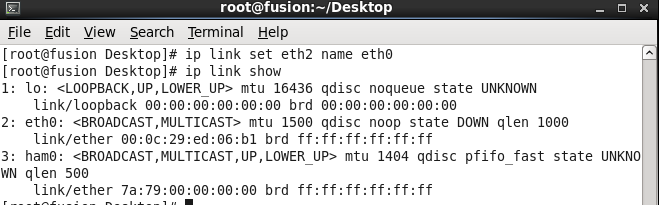
Cloned Oracle Linux (OEL) is missing eth0

Issue:-In my case i faced problem with oracle linux 6.5 cloned server is 
            that it would not have the eth0 network interface
            (no IP address from the DHCP).

Note:-I use a DHCP to assign the IP addresses to these cloned servers.

Troubleshooting:-

I had a problem with the eth0 network interface missing with the cloned server.
ifconfig – When I ran the ifconfig command, I did not see the DHCP assigned IP address.
When we ran the command ip link show, I did not see the network interface eth0.
I tried running network restart command i received below error
Bringing up interface eth0:  Device eth0 does not seem to be present, delaying initialization.

Solution:-

1.) Login as root
2.) Run the command to remove this file: 
      rm –f /etc/udev/rules.d/70-persistent-net.rules
3.) Edit the file ifcfg-eth0
      run following command: vim /etc/sysconfig/network-scripts/ifcfg-eth0
4.) Remove two line from this file. The line that starts with UUID, and the line
      that starts with HWADDR.

5.) Once above two lines are removed them save and quit (wq!)
6.) Run following below command
      ip link set eth1 name eth0
7.) Run following command ip link show to verify that it was renamed
8.)Reboot your machine and Login as root
9.)Run following command and verify:-ifconfig


Thanks,
Aditya.

Saturday, 7 April 2018

Unable to Login to OAM Console after changing the Default System Store

Version:-OAM 11.1.2.3.0

CAUSE

At the time of creating Identity Store. The option of "This is the System Store" option was selected.
It is recommended to keep "Embeded LDAP Server" as default identity store.

SOLUTION

1) Goto location /uo02/Oracle_IDM1/common/bin
    Where Oracle_IDM1 is the Oracle home of the IAM Suite

2) Execute the below mentioned commands
    /u02/Oracle_IDM1/common/bin>wlst.bat  or wlst.sh
    on Unix Systems
    wls:/offline> connect()
    Please enter your username :weblogic
    Please enter your password :
    wls:/OMS/serverConfig> displayUserIdentityStore('UserIdentityStore1')
    wls:/OMSbase_domain/serverConfig>                                                   
    editUserIdentityStore(name="UserIdentityStore1",isPrimary="true"
    ,isSystem="true")

3) Restart all your managed servers.

4) Verify if you are able to login as Weblogic user or not.


Thanks,
Aditya.

Wednesday, 4 April 2018

Internal error: Cannot obtain XAConnection weblogic.common.resourcepool.ResourceLimitException


Error:-


[2018-02-22T16:03:42.264+05:30] [oim_server1] [NOTIFICATION] [] [org.eclipse.persistence.session.oim] [tid: OIMQuartzScheduler_Worker-9] [userId: oiminternal] [ecid: 0000M6wj4gxFk3QLUa4Eyc1QZcOi000004, 1:22446] [APP: oim#11.1.2.0.0] Communication failure detected when attempting to perform read query outside of a transaction. Attempting to retry query. Error was: Exception [EclipseLink-4002] (Eclipse Persistence Services - 2.3.1.v20111018-r10243): org.eclipse.persistence.exceptions.DatabaseException [[Internal Exception: java.sql.SQLException: Internal error: Cannot obtain XAConnection weblogic.common.resourcepool.ResourceLimitException: No resources currently available in pool oimOperationsDB to allocate to applications, please increase the size of the pool and retry..at weblogic.common.resourcepool.ResourcePoolImpl.reserveResourceInternal(ResourcePoolImpl.java:604)
        at weblogic.common.resourcepool.ResourcePoolImpl.reserveResource(ResourcePoolImpl.java:353)
        at weblogic.common.resourcepool.ResourcePoolImpl.reserveResource(ResourcePoolImpl.java:340)
        at weblogic.jdbc.common.internal.ConnectionPool.reserve(ConnectionPool.java:469)
        at weblogic.jdbc.common.internal.ConnectionPool.reserve(ConnectionPool.java:363)
        at weblogic.jdbc.common.internal.ConnectionPoolManager.reserve(ConnectionPoolManager.java:125)
        at weblogic.jdbc.common.internal.ConnectionPoolManager.reserve(ConnectionPoolManager.java:77)
        at weblogic.jdbc.jta.DataSource.getXAConnectionFromPool(DataSource.java:1791)
        at weblogic.jdbc.jta.DataSource.refreshXAConnAndEnlist(DataSource.java:1582)
        at weblogic.jdbc.jta.DataSource.getConnectionInternal(DataSource.java:499)
        at weblogic.jdbc.jta.DataSource.getConnection(DataSource.java:483)
        at weblogic.jdbc.common.internal.RmiDataSource.getConnectionInternal(RmiDataSource.java:527)
        at weblogic.jdbc.common.internal.RmiDataSource.getConnection(RmiDataSource.java:513)
        at weblogic.jdbc.common.internal.RmiDataSource.getConnection(RmiDataSource.java:506)
        at org.eclipse.persistence.sessions.JNDIConnector.connect(JNDIConnector.java:123)
        at org.eclipse.persistence.sessions.DatasourceLogin.connectToDatasource(DatasourceLogin.java:162)
        at org.eclipse.persistence.internal.databaseaccess.DatasourceAccessor.connectInternal(DatasourceAccessor.java:330)
        at org.eclipse.persistence.internal.databaseaccess.DatabaseAccessor.connectInternal(DatabaseAccessor.java:293)
        at org.eclipse.persistence.internal.databaseaccess.DatasourceAccessor.reconnect(DatasourceAccessor.java:565)
        at org.eclipse.persistence.internal.databaseaccess.DatabaseAccessor.reconnect(DatabaseAccessor.java:1508)
        at org.eclipse.persistence.internal.databaseaccess.DatasourceAccessor.incrementCallCount(DatasourceAccessor.java:305)
        at org.eclipse.persistence.internal.databaseaccess.DatabaseAccessor.basicExecuteCall(DatabaseAccessor.java:579)
        at org.eclipse.persistence.internal.databaseaccess.DatabaseAccessor.executeCall(DatabaseAccessor.java:535)
        at org.eclipse.persistence.internal.sessions.AbstractSession.basicExecuteCall(AbstractSession.java:1717)
        at org.eclipse.persistence.sessions.server.ServerSession.executeCall(ServerSession.java:566)
        at org.eclipse.persistence.sessions.server.ClientSession.executeCall(ClientSession.java:207)
at org.eclipse.persistence.internal.queries.DatasourceCallQueryMechanism.executeCall(DatasourceCallQueryMechanism.java:207)
        at org.eclipse.persistence.internal.queries.DatasourceCallQueryMechanism.executeCall(DatasourceCallQueryMechanism.java:193)
        at org.eclipse.persistence.internal.queries.DatasourceCallQueryMechanism.executeSelectCall(DatasourceCallQueryMechanism.java:264)
        at org.eclipse.persistence.internal.queries.DatasourceCallQueryMechanism.selectAllRows(DatasourceCallQueryMechanism.java:646)
        at org.eclipse.persistence.internal.queries.ExpressionQueryMechanism.selectAllRowsFromTable(ExpressionQueryMechanism.java:2611)
        at org.eclipse.persistence.internal.queries.ExpressionQueryMechanism.selectAllRows(ExpressionQueryMechanism.java:2570)
        at org.eclipse.persistence.queries.ReadAllQuery.executeObjectLevelReadQuery(ReadAllQuery.java:420)
        at org.eclipse.persistence.queries.ObjectLevelReadQuery.executeDatabaseQuery(ObjectLevelReadQuery.java:1081)
        at org.eclipse.persistence.queries.DatabaseQuery.execute(DatabaseQuery.java:844)
        at org.eclipse.persistence.queries.ObjectLevelReadQuery.execute(ObjectLevelReadQuery.java:1040)
        at org.eclipse.persistence.queries.ReadAllQuery.execute(ReadAllQuery.java:392)
        at org.eclipse.persistence.internal.sessions.AbstractSession.internalExecuteQuery(AbstractSession.java:2831)
        at org.eclipse.persistence.internal.sessions.AbstractSession.executeQuery(AbstractSession.java:1516)
        at org.eclipse.persistence.internal.sessions.AbstractSession.retryQuery(AbstractSession.java:1586)
        at org.eclipse.persistence.sessions.server.ClientSession.retryQuery(ClientSession.java:593)
        at org.eclipse.persistence.internal.sessions.AbstractSession.executeQuery(AbstractSession.java:1552)
        at org.eclipse.persistence.internal.sessions.AbstractSession.retryQuery(AbstractSession.java:1586)
        at org.eclipse.persistence.sessions.server.ClientSession.retryQuery(ClientSession.java:593)
        at org.eclipse.persistence.internal.sessions.AbstractSession.executeQuery(AbstractSession.java:1552)
        at org.eclipse.persistence.internal.sessions.AbstractSession.executeQuery(AbstractSession.java:1498)
        at org.eclipse.persistence.internal.sessions.AbstractSession.executeQuery(AbstractSession.java:1449)
        at org.eclipse.persistence.internal.sessions.AbstractSession.readAllObjects(AbstractSession.java:3193)
        at oracle.iam.scheduler.impl.util.SchedulerUtil.getLastHistoryOfJob(SchedulerUtil.java:1245)
        at oracle.iam.scheduler.impl.quartz.QuartzJob$TaskExecutionAction.run(QuartzJob.java:188)
        at java.security.AccessController.doPrivileged(Native Method)
        at oracle.security.jps.util.JpsSubject.doAsPrivileged(JpsSubject.java:266)
        at oracle.security.jps.internal.jaas.AccActionExecutor.execute(AccActionExecutor.java:65)
        at oracle.security.jps.internal.jaas.AbstractSubjectSecurity$ActionExecutorWrapper.execute(AbstractSubjectSecurity.java:228)
        at oracle.security.jps.internal.jaas.CascadeActionExecutor$SubjectPrivilegedAction.run(CascadeActionExecutor.java:68)
        at weblogic.security.acl.internal.AuthenticatedSubject.doAs(AuthenticatedSubject.java:321)
        at weblogic.security.service.SecurityManager.runAs(SecurityManager.java:120)
        at weblogic.security.Security.runAs(Security.java:41)
        at oracle.security.jps.wls.jaas.WlsActionExecutor.execute(WlsActionExecutor.java:47)
        at oracle.security.jps.internal.jaas.CascadeActionExecutor.execute(CascadeActionExecutor.java:50)
        at oracle.security.jps.internal.jaas.AbstractSubjectSecurity$ActionExecutorWrapper.execute(AbstractSubjectSecurity.java:228)
        at Thor.API.Security.LoginHandler.AssertionLoginSession.runAs(AssertionLoginSession.java:93)
        at oracle.iam.scheduler.impl.quartz.QuartzJob.execute(QuartzJob.java:85)
        at org.quartz.core.JobRunShell.run(JobRunShell.java:202)
        at org.quartz.simpl.SimpleThreadPool$WorkerThread.run(SimpleThreadPool.java:529)

Cause:-

DB is down and listener is not up and running.


Solution:-

1. Open new terminal and check with lsnrctl status
2. Check DB connectivity through sqldeveloper
3. Contact DB team and ensure that DB and listener are up and running.


Thanks,
Aditya.


Sunday, 1 April 2018

UnicastUdpSocket failed to set receive buffer size to 1444 packets

Error:-


<Mar 15, 2018 1:16:29 PM IST> <Warning> <Coherence> <BEA-000000> <2018-03-15 13:16:29.502/406.395 Oracle Coherence GE 3.7.1.13 <Warning> (thread=[ACTIVE] ExecuteThread: '0' for queue: 'weblogic.kernel.Default (self-tuning)', member=n/a): PreferredUnicastUdpSocket failed to set receive buffer size to 1444 packets (1.99MB); actual size is 25%, 361 packets (511KB). Consult your OS documentation regarding increasing the maximum socket buffer size. Proceeding with the actual value may cause sub-optimal performance.>


<Mar 15, 2018 1:16:59 PM IST> <Warning> <Coherence> <BEA-000000> <2018-03-15 13:16:59.697/436.590 Oracle Coherence GE 3.7.1.13 <Warning> (thread=Cluster, member=n/a): This Member(Id=0, Timestamp=2018-03-15 13:16:29.524, Address=10.148.192.126:8088, MachineId=8272, Location=site:,machine:droim04,process:18049, Role=WeblogicServer) has been attempting to join the cluster at address /227.7.7.12:9778 with TTL 4 for 30 seconds without success; this could indicate a mis-configured TTL value, or it may simply be the result of a busy cluster or active failover.>

<Mar 15, 2018 1:16:59 PM IST> <Warning> <Coherence> <BEA-000000> <2018-03-15 13:16:59.698/436.591 Oracle Coherence GE 3.7.1.13 <Warning> (thread=Cluster, member=n/a): Received a discovery message that indicates an older member announcing:


Resolution:-

Though it is safe to operate with the smaller buffers it is recommended that you configure your OS to allow for larger buffers.

On Linux execute (as root):-

Go to /etc/sysctl/conf fine and change below value

sysctl -w net.core.rmem_max=2096304

sysctl -w net.core.wmem_max=2096304


Regards,
Aditya.